An operations manager at a distribution business in Indore needs one thing done every morning: log into a supplier's ordering portal, an old-fashioned web app with no API, no CSV export and no webhook of any kind, check current stock levels, and update the reorder sheet before the sales team starts calling. There's no automation vendor to plug in here, because there's nothing to call, the only interface the portal exposes is the same one a human uses: a mouse, a keyboard and a screen. Every workflow tool that automates through APIs is structurally locked out of this task, not because it's hard, but because there's no endpoint underneath it. This is exactly the gap computer-use AI agents were built to close, and understanding how the loop actually works, and how reliable it actually is today, matters more than the hype cycle around it.
What is a computer-use AI agent, and how is it different from a normal AI agent?
A standard AI agent, the kind built in n8n or with function calling, operates through defined tools: named functions with structured parameters, like 'create_invoice' or 'send_email', that call a specific API endpoint under the hood. A computer-use agent has no such API to call. Instead, it perceives and acts on a graphical interface exactly the way a human does: it's handed a screenshot of the current screen, decides where the cursor needs to move and what to click or type next, receives the resulting screenshot, and repeats.
That distinction is the whole point of the technology. A function-calling agent is fast, cheap and reliable, but only for software that exposes an API. A computer-use agent is slower and far less reliable today, but it can operate literally anything with a screen, a legacy ERP, a government e-filing portal, a supplier system, the exact class of tool MCP-based integrations can't reach either, because there's no structured interface underneath to connect to.
What's actually happening inside the perception-action loop?
The architecture is a straightforward loop, but it's worth understanding literally, because its limitations follow directly from it. First, the agent receives a screenshot, a static image of the current screen, not a live video feed and not a DOM tree the way a browser extension agent gets. Second, a vision-capable model interprets what's on screen and decides the next action: move the cursor, click, type, scroll, or take a screenshot again to check the result. Third, because the model has no accessibility tree telling it where UI elements sit, it has to work out pixel coordinates directly, as Anthropic describes it, the model counts how many pixels vertically or horizontally the cursor needs to move to land in the correct place. Fourth, that action executes inside a sandboxed virtual machine, and a fresh screenshot comes back to start the next cycle.
That 'flipbook' style of observation, one still frame at a time rather than continuous video, is also where it breaks: a short-lived toast notification, a dropdown that closes on its own, or a loading spinner that resolves between two screenshots can simply never register with the model at all, because nothing was watching in that gap.
How reliable is a computer-use agent today, really?
| Agent | OSWorld benchmark score | What that means in practice |
|---|---|---|
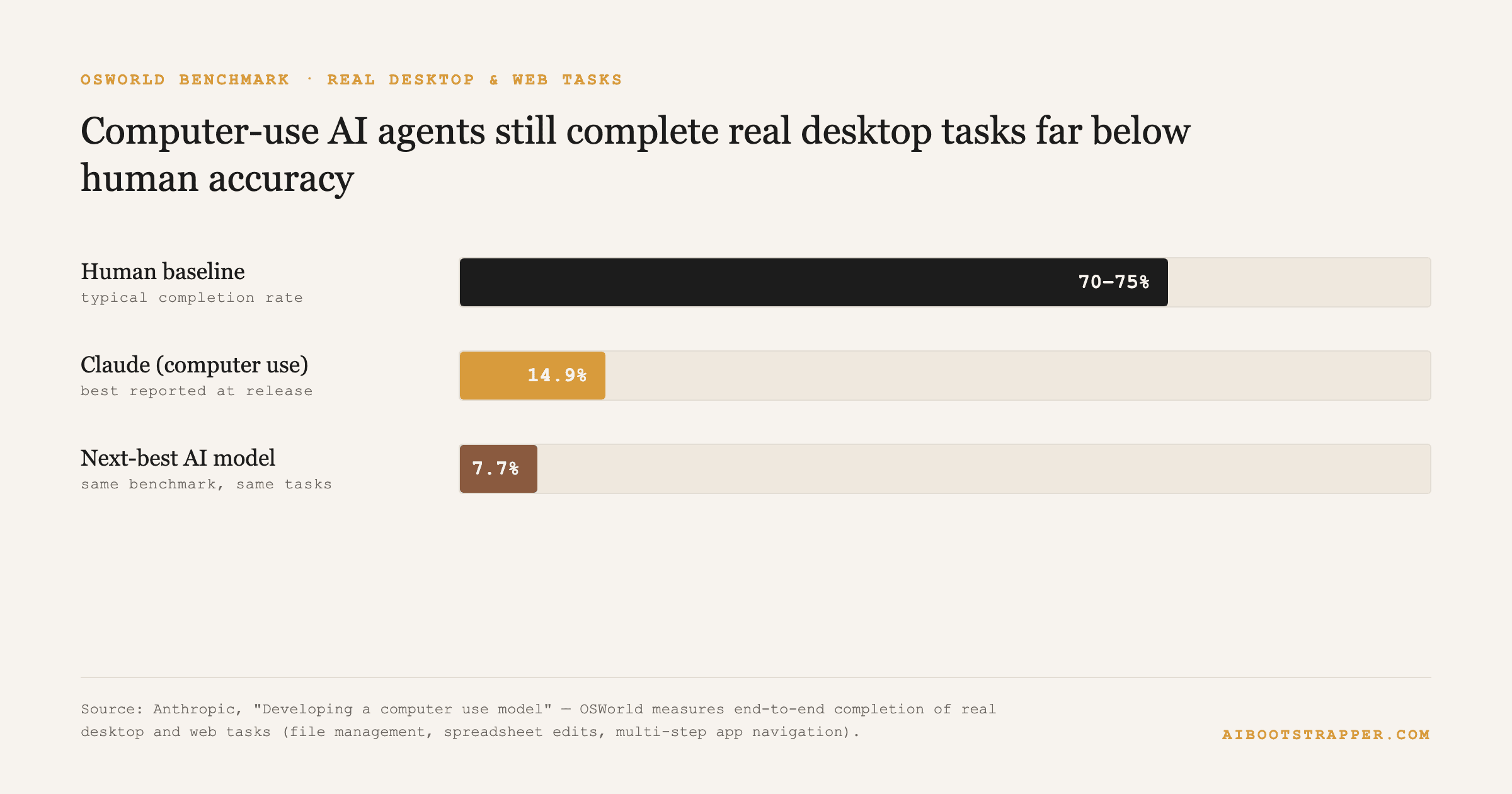
| Human baseline | 70–75% | A person completes roughly 7 to 8 of every 10 real desktop tasks correctly |
| Claude (computer use) | 14.9% | Best publicly reported AI score at the technique's release, roughly 1 in 7 tasks |
| Next-best AI model tested | 7.7% | Less than half of Claude's score on the identical benchmark |
OSWorld tasks include file management, spreadsheet edits and multi-step app navigation. Source: Anthropic, "Developing a computer use model."
So where does a computer-use agent actually make sense for a business today?
- Legacy or vendor portals with no API at all, where the alternative isn't a faster automation, it's a person doing it manually every day, and a slow-but-working agent still beats that baseline.
- Narrow, structured, repetitive, low-judgment screen tasks, like replicating one data entry across two systems, not open-ended multi-app workflows a human would have to improvise through.
- A fallback path that sits behind an API-first automation, not a replacement for one, exactly the framing covered in n8n vs. AI agents: when to use each: if an API exists, use it, a computer-use agent is for the gap left over once it doesn't.
- Always run in a sandboxed environment with scoped, disposable credentials, never given direct production logins, following the same least-privilege discipline that applies to any agent with real-world reach.
Isn't giving an AI a keyboard and mouse a bigger security risk than a normal agent?
Yes, structurally more so. A function-calling agent's blast radius is limited to whatever functions it was given; a computer-use agent's blast radius is whatever a human logged into that machine could do, which is a much larger surface. That's exactly why least-privilege scoping and a genuinely isolated sandbox, not just a separate browser tab, matter more here than with any other agent architecture: restrict what applications and credentials are reachable from inside the sandbox, log every action taken, and keep a human-approval checkpoint before anything that submits, spends or sends.
How AIBOOTSTRAPPER helps
AIBOOTSTRAPPER's automation team scopes every new build, including computer-use agents, against exactly this reliability data, a technique with a 14.9% OSWorld score is a tool for a narrow, supervised task today, not a way to hand over an entire workflow unattended. Most of the time, the right build is still an API-first n8n workflow wired to the systems that actually expose one.
If a workflow is stuck because the tool you need to touch has no API, book a call and we'll tell you honestly whether a computer-use agent is a good fit for it yet, or whether there's a more reliable way to close the gap.
Want this done for you?
Book a free strategy call and we'll show you how to build and market your business with AI.