A founder builds an n8n workflow that catches every new lead from a webhook, enriches it with an AI agent, and fires a personalized follow-up within minutes, the exact pattern in our own guide to automating lead follow-up with n8n and GPT-4. It works perfectly in testing, one lead at a time, clean and fast. Then a paid campaign goes live, 200 leads land inside an hour, and the follow-ups start arriving three hours late, or not at all. Nothing crashed. Nothing threw a visible error. The instance was just never built to hold that many requests at once, because standard mode makes one process do two jobs that don't scale the same way.
Why does a single n8n instance fall over under real traffic?
In n8n's default standard mode, one process does everything: it accepts the incoming webhook, and it also runs the workflow to completion before it's free to accept the next one. That's fine at low volume, but the two jobs have completely different resource profiles. Accepting a webhook is near-instant. Running an AI agent step that calls an LLM, waits on its response, then writes to a CRM can take several seconds, and every second that request holds the process, it can't accept anything new.
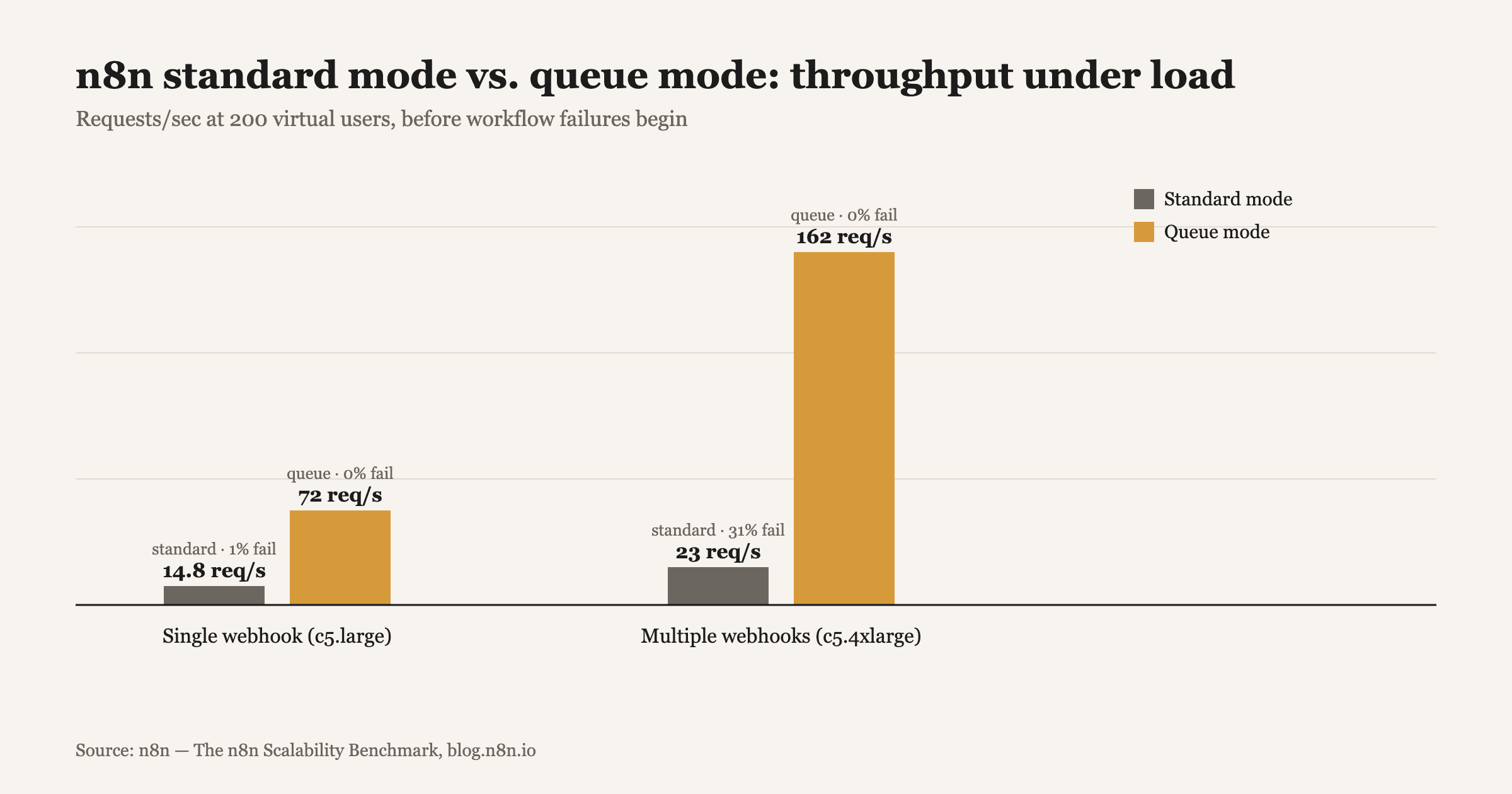
n8n's own scalability benchmark measured this directly: a standard-mode instance handling a single webhook topped out at 14.8 requests per second with a 1% failure rate under load, and once the test added multiple webhook triggers competing for the same process, standard mode's failure rate jumped to 31%. That's not a misconfiguration, it's the architecture doing exactly what it's built to do, one request at a time, on one process.
What queue mode actually changes, architecturally
Queue mode splits those two jobs onto different processes. A main instance still accepts the webhook, but instead of running the workflow itself, it drops the job onto a Redis queue and immediately frees up to accept the next request. Separate worker processes pull jobs off that queue and execute them, and because you can run as many workers as the workload needs, execution capacity scales independently of intake capacity.
The benchmark shows exactly what that buys: the same single-webhook scenario went from 14.8 requests per second in standard mode to 72 in queue mode with zero failures, and the multi-webhook scenario went from 23 requests per second at a 31% failure rate to 162 requests per second with a 0% failure rate. On a larger instance, n8n measured a 10x throughput gain from vertical scaling plus queue mode's architecture together, which is the real lift: queue mode doesn't just add capacity, it removes the structural bottleneck standard mode has no way around.
How to actually set up and monitor queue mode
- Set EXECUTIONS_MODE=queue and point n8n at a Redis instance, self-hosted queue mode isn't available on n8n Cloud today, so this is a self-hosted or enterprise deployment decision.
- Start with a conservative worker count and scale up based on observed demand rather than guessing at capacity upfront, since over-provisioning workers for a workload that never arrives just adds infrastructure cost with no reliability benefit.
- Monitor three signals continuously: queue depth (jobs waiting for a free worker), worker CPU/memory utilization, and execution time percentiles, n8n's own production deployment guide recommends tracking p50, p95 and p99 execution times specifically, because an average that looks healthy can still hide a tail of requests timing out.
- Pair queue mode with retry and idempotency logic on every step that writes to an external system, since a worker crash mid-execution shouldn't mean a lead gets contacted twice, or not at all; our breakdown of retries and idempotency in n8n workflows covers the pattern in detail.
- Load-test with bursty traffic before launch, not steady traffic, since a real campaign or product launch rarely arrives evenly spread across the hour, it arrives as a spike, and that's exactly the condition standard mode fails under first.
When is queue mode actually worth the added infrastructure?
Not every workflow needs it. A low-volume internal automation running a handful of times a day is fine in standard mode, and adding Redis and worker orchestration for that workload is complexity with no payoff. Queue mode earns its keep once a workflow is customer-facing, bursty, or touches an AI agent step whose latency you don't fully control, exactly the profile of a lead-capture webhook, an inbound support trigger, or anything wired to the kind of multi-provider AI agent calls covered in our rate-limit and circuit-breaker piece, where a single slow upstream call can otherwise stall the whole instance behind it.
The honest signal to watch for is the same one that caught the founder in the opening example: a workflow that behaves perfectly in every manual test, but starts silently missing events the moment real, uneven traffic hits it. That gap between demo behavior and production behavior is exactly what queue mode is built to close.
How AIBOOTSTRAPPER helps
This is the kind of production-reliability gap that doesn't show up until a workflow is actually carrying real business volume, which is why we scope automation builds around the traffic pattern the workflow will actually see, not just the happy-path demo. If a lead-capture, support-triage, or AI agent workflow needs to hold up under bursty real-world traffic rather than fall over quietly the first time it gets busy, book a call and we'll walk through whether your current setup needs queue mode, or something else entirely.
Want this done for you?
Book a free strategy call and we'll show you how to build and market your business with AI.